
Tired of wrestling with generic templates that never quite fit your brand? MorningAI's new Layouts feature eliminates the guesswork from content creation by delivering design concepts that actually understand your brand before you write a single word.
Why Layouts Matter for Your Content Strategy
Traditional design templates force you to retrofit your brand into someone else's vision. MorningAI's Layouts work the opposite way: they adapt to your brand's unique identity from the start. This means faster creation times, stronger brand consistency, and professional results without the professional price tag.
Instead of scrolling through thousands of irrelevant templates, you get targeted design options that match both your brand guidelines and your specific project goals.
What Are Layouts?
Layouts are personalized design concepts that appear when you select certain briefs in MorningAI Studio. Think of them as smart templates that already know your logo, colors, and brand personality before you begin creating.
Each layout maintains its core design structure while automatically incorporating your brand elements, ensuring every piece of content feels distinctly yours.
How to Use Layouts: Step-by-Step
1. Access Available Briefs
Navigate to Studio and select one of these brief types:
- Print Ads
- Facebook Posts
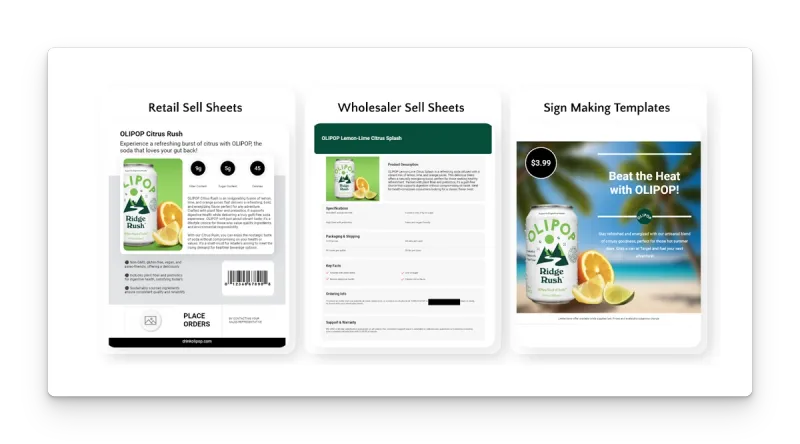
- Signmaking

2. Browse Layout Options
After selecting your brief, you'll see a gallery of layout concepts tailored to your brand and project type. Each option shows how the design structure will accommodate your content.
3. Select Your Preferred Layout
Choose the layout that best matches your campaign goals and aesthetic preferences. The design composition will remain consistent while your brand elements populate automatically.
4. Complete Your Brief
Fill out the brief details as usual. Your selected layout will guide the final output, ensuring design and content work together seamlessly.
5. Review and Refine
Once generated, review your content. The layout provides the visual foundation while MorningAI's insights drive the copy and messaging.
Real-World Use Cases
Local Business Owner: A restaurant needs consistent social media posts for their weekly specials. Layouts ensure each Facebook post maintains the same professional look while highlighting different dishes.
Marketing Manager: Creating a series of print ads for different products. Layouts maintain brand consistency across the campaign while allowing product-specific customization.
Franchise Owner: Needs signage that follows corporate brand guidelines but includes location-specific information. Layouts handle the brand compliance automatically.

What Makes Layouts Smarter Than Templates
Layouts Automatically Include:
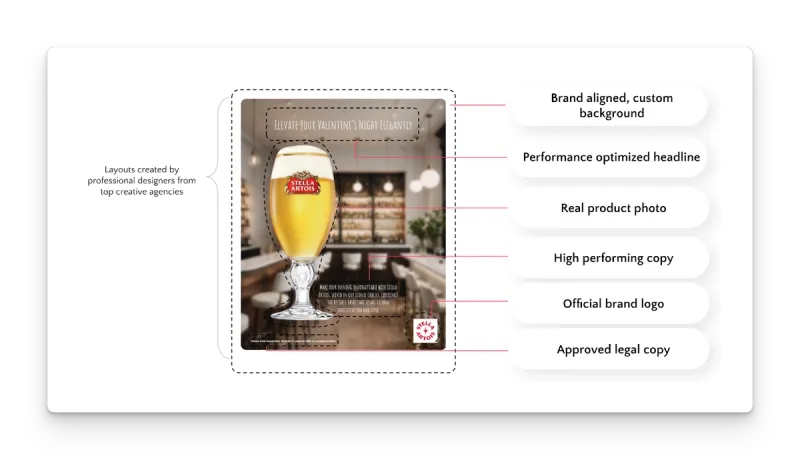
- Your logo placement
- Brand color schemes
- Relevant copy based on your brief
- Legal disclaimers when needed
- Product details and customer insights
What Stays Consistent:
- Design composition and visual hierarchy
- Text box and image placement
- Overall aesthetic structure
This approach eliminates the tedious process of manually adjusting generic templates to fit your brand requirements.
Pro Tips for Maximum Impact
Start with the End in Mind: Before selecting a layout, consider where the content will be used. Print ads need different visual approaches than social media posts.
Leverage Brief Details: The more specific your brief information, the better your layout will perform. Include key messaging points and target audience details.
Test Different Options: Since layouts adapt to your brand automatically, experiment with different design approaches for the same campaign to see what resonates best.
Frequently Asked Questions
Can I modify a layout after selecting it? Yes. Layouts give you a brand-approved starting point, then you customize from there. Edit text, swap product details from your ProductDNA, generate new visuals with your BrandDNA style, or adjust colors and fonts in the editor. Most teams treat layouts as shortcuts to consistent content, then tailor them for specific campaigns or audiences.
What if I want a custom layout unique to my brand? You can work with MorningAI to develop layouts that match your specific visual requirements. Your Customer Success Manager handles the setup process.
How many layout options will I see for each brief? The number varies by brief type, but MorningAI is expanding to over 1,000 layouts across all brief categories.
Can I use the same layout for multiple pieces of content? Yes. Layouts are designed for reuse across campaigns, ensuring consistency while allowing content-specific customization.
Ready to Try Layouts?
Start with a Print Ad, Facebook Post, or Signmaking brief in MorningAI Studio to experience how Layouts can streamline your content creation process. The feature works best when you provide detailed brief information, so take a moment to fill out all relevant fields for optimal results.
