October 5, 2026 Product Updates: Social Performance Analytics, Klaviyo Connector, and the Agent Sidebar
Channels shows how each post performed, and an Agent turns it into your weekly marketing review. Build Klaviyo campaigns from your brand. Ask the Agent from the sidebar.

This week, we brought post-by-post performance into Channels for LinkedIn, Facebook, and Instagram. Agent can now turn those numbers into your weekly marketing performance review. MorningAI also connects with Klaviyo, so you can build email campaigns in your brand's voice without leaving the Agent. And the new Agent Sidebar puts the Agent right beside the page you are working on.
Here's what changed.
Channels
Social performance analytics in Channels
Pulling numbers shouldn’t take up your Monday morning. MorningAI brings post-level analytics into Channels and lets the Agent turn your connected marketing data into a weekly review.
1. Channels shows how every social post performed.
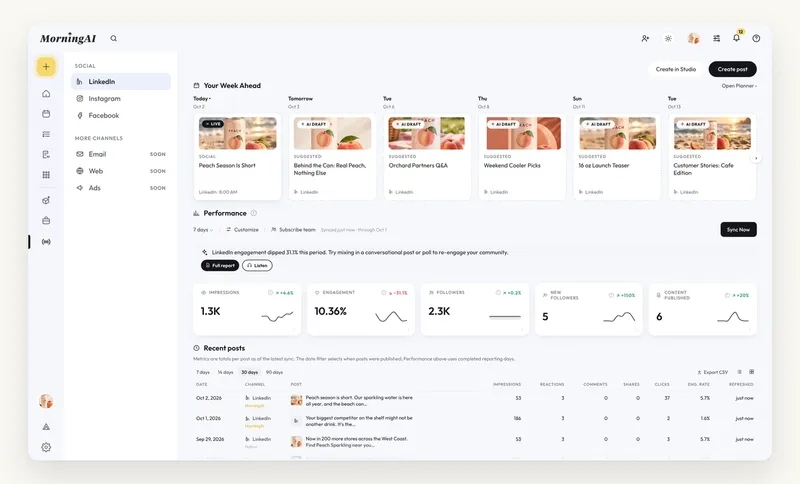
- Open LinkedIn, Facebook, or Instagram under Channels, and the Performance section tracks impressions, engagement, followers, new followers, and content published, each with a trend line and a change against the period before, plus a one-line read on what moved and what to try next (open Full report for the rest).
- Below it, Recent posts lists every post with the metrics its platform reports, such as impressions, reactions, comments, shares, clicks, and engagement rate, filtered to the last 7, 14, 30, or 90 days. You can see exactly which posts drove the most engagement.
2. Ask the Agent to run the weekly marketing performance review.
We added a Weekly Marketing Report Playbook to the library, so you can type /WeeklyMarketingReport in the composer, or just ask:
“How did our marketing do last week? Give me the weekly review.”
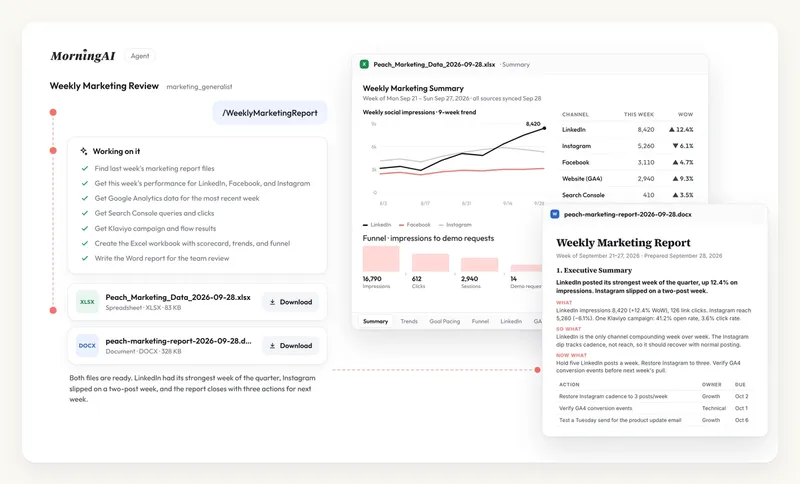
The Agent then works through it step by step:
- Finds last week’s report, if there is one, so this week picks up where it left off
- Pulls last week’s performance from your social channels: LinkedIn, Facebook, and Instagram
- Pulls the rest from your connectors: Google Analytics and Search Console for site and search, Klaviyo for email
- Builds the output you ask for: an Excel workbook with the scorecard, trends, and funnel, a Word report that walks through last week's performance and your next actions, or an HTML or PDF version with the charts built in
Run your weekly marketing review →
Connectors
Connect Klaviyo and build email campaigns in your brand's voice
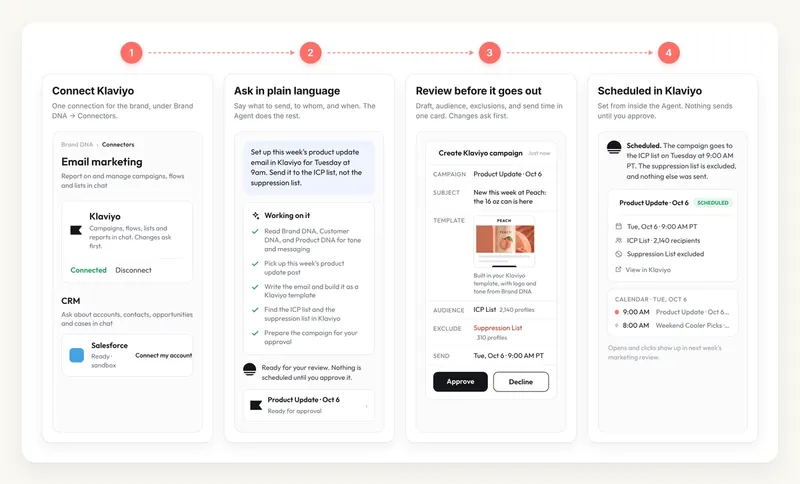
MorningAI now connects with Klaviyo. Connect it under Brand DNA → Connectors, and the Agent can plan, build, and report on your campaigns, flows, and lists with what it already knows about your brand.
For example:
“Set up this week's product update email in Klaviyo for Tuesday at 9am. Send it to the ICP list, not the suppression list.”
- Pulls tone and messaging from your Brand DNA, Customer DNA, and Product DNA, and picks up this week's product update post for the content
- Writes the email and builds it as a Klaviyo template
- Finds both lists in Klaviyo and sets the audience and exclusions
- Shows you the draft, audience, and send time for approval, then schedules it
All of it happens inside the MorningAI Agent.
Like what you're reading?
See these ideas run on your own brand — book a demo and we'll show you MorningAI in action on your products.
Agents
Work with the Agent from the sidebar, right where you are
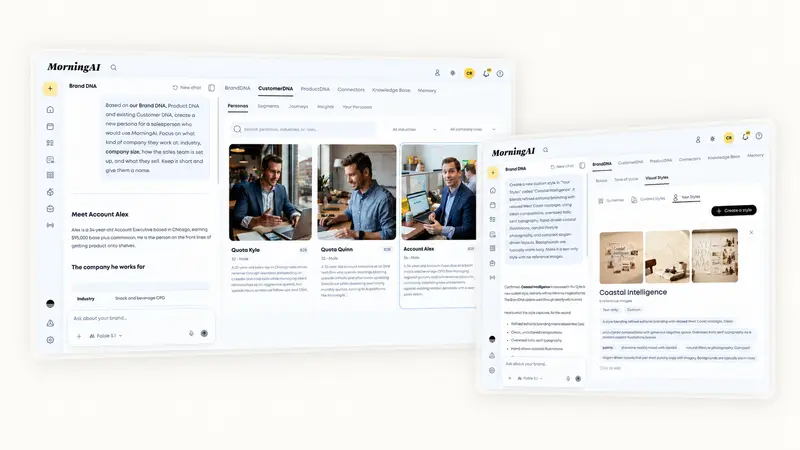
The Agent panel now sits beside the pages you work in (Brand DNA, Customer DNA, Product DNA, Tasks). Open it on the left, say what you want changed, and keep working. No need to go to the main Agent and describe what you are looking at.
For example, from the Customer DNA page:
“Create a persona for a salesperson who would use our product. Keep it short and give them a name.”
- Reads your Brand DNA, Product DNA, and current personas
- Drafts the persona: industry, company size, how the sales team is set up, what they sell
- Shows it as an approval card
- You approve, and the persona appears in Customer DNA
Each page keeps its own conversation, so the context stays with the work.
Also in this release
- New model in Agents: Anthropic’s Sonnet 5.5 is now available in the model menu.
- Playbook labels: Playbooks now carry a New or Updated label, so you can spot what was added or changed in the library.
- Minimize Agent questions: Collapse the question panel into a compact bar to see more of your workspace. Reopen it with your selected answers still in place.
Try the Updates
Log in to MorningAI to try this week’s updates.
If something feels off or you run into an issue, let us know. We read every message.
– The MorningAI Team

Related posts
September 28, 2026 Product Updates: New Frontier Models in Agents, Agent-Run CMS Publishing, and Tasks Built Into MorningAI
Access the latest models from Anthropic, OpenAI, and xAI, take CMS content end to end with Agents, and manage your team’s work in the new Tasks area.

September 21, 2026 Product Updates: Multi-Model Selection, Smarter Social Post Reviews, and Upgraded Image Creation and Editing in Agents
Agents now let you switch models by task, use recent social performance to improve upcoming posts, and generate a wider variety of images with more control over formats and edits.

September 14, 2026 Product Updates: New Audio in Studio, 20-Image Generation, and Calendar List View
Create audio in Studio, generate up to 20 images in one run, and scan your content more easily with the new Calendar List view.