November 16, 2026 Product Updates: HubSpot and Apollo Connectors, Knowledge Base in DNA, and Live File Preview
Connect HubSpot and Apollo to the Agent, keep your brand's documents in the new Knowledge Base tab, and preview files while the Agent builds them.

This week, we brought two tools that marketing and sales teams work in every day into the Agent, with new HubSpot and Apollo connectors. We also added a Knowledge Base tab to DNA for the documents your agents read, and a live preview for the files the Agent builds.
Here's what changed.
Connectors
Work your CRM and your prospecting from one chat with HubSpot and Apollo
Following up with the contacts you have and finding new ones usually happens in two tools, HubSpot and Apollo. Both are now connectors in MorningAI.
Connect HubSpot or Apollo once under DNA → Connectors. The Agent can then read from the tool and make changes in it, in the same conversation where it works with your brand, your products and your files. Anything that changes your data is shown to you for approval first.
Each teammate connects with their own login to your company's HubSpot or Apollo workspace.
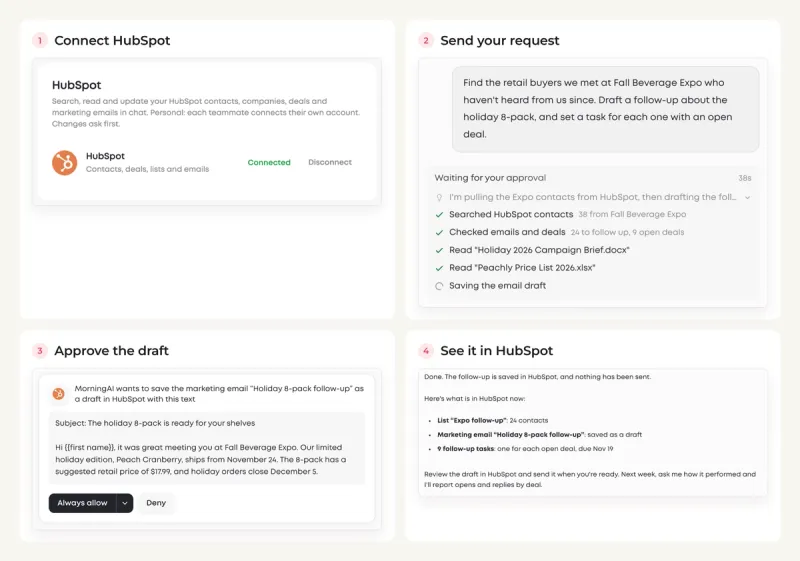
1. HubSpot: follow up with the contacts you already have
With HubSpot connected, you can ask the Agent to:
- Find the right people: look up contacts, companies and deals, or pull everyone who matches a filter, such as event leads with no email in the last 30 days.
- Write the follow-up: draft a marketing email in your brand's voice and save it to HubSpot as a draft.
- Keep the CRM current: create a list, update records, and add notes or follow-up tasks.
- Report back: check how a campaign or an email performed.
For example, you can ask:
"Find the retail buyers we met at Fall Beverage Expo who haven't heard from us since. Draft a follow-up about the holiday 8-pack, and set a task for each one with an open deal."
2. Apollo: find new buyers and start outreach
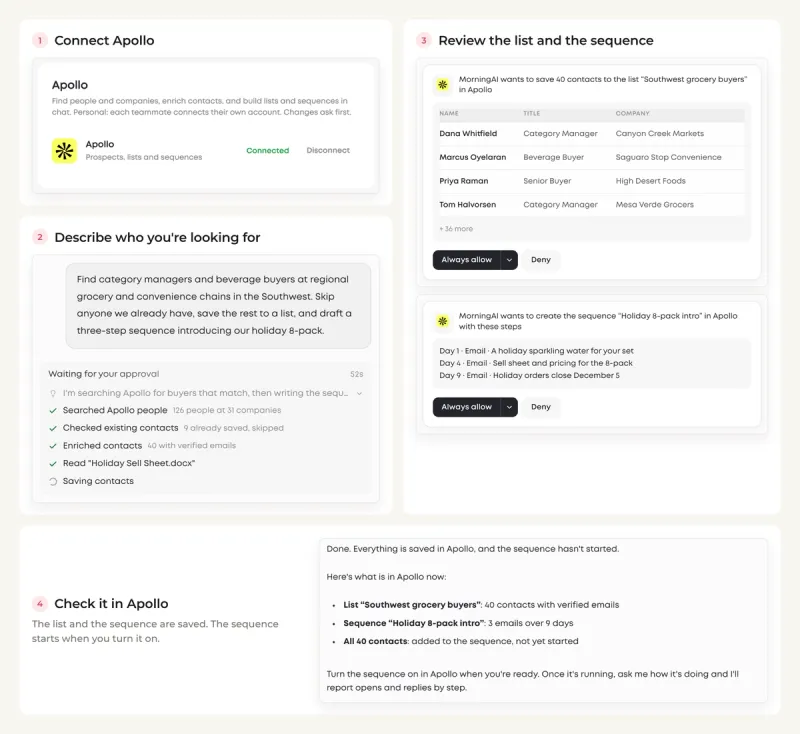
With Apollo connected, you can ask the Agent to:
- Build a prospect list: search for people and companies by title, industry, region and company size.
- Clean and enrich it: skip the contacts you already have and add verified emails to the rest.
- Start outreach: write an email sequence in your brand's voice and add the contacts to it. The sequence starts when you turn it on in Apollo.
- Report back: see opens and replies for each step of a running sequence.
For example, you can ask:
"Find category managers and beverage buyers at regional grocery and convenience chains in the Southwest. Skip anyone we already have, save the rest to a list, and draft a three-step sequence introducing our holiday 8-pack."
Like what you're reading?
See these ideas run on your own brand — book a demo and we'll show you MorningAI in action on your products.
DNA
A new Knowledge Base tab in DNA for the documents your agents use
We added a Knowledge Base tab to the DNA page, next to Memory. Upload the documents that describe how your brand works, such as brand guides, policies, price lists and briefs, as single files or as a whole folder. Your agents read them and use them in their work.
The tab shows the same documents as the Knowledge Base drive in Files. Add or delete a document in one place, and the other updates with it.
This matters most when a task depends on your own details. Ask the Agent to reply to a retail buyer, and the draft uses the minimum order, lead time and payment terms from your wholesale terms. Under the answer, the Agent lists the files it used.

Agents
Live preview for the files the Agent builds
A landing page or a deck takes the Agent a few minutes to build, and that is exactly when you want to see how it's turning out.
We added a live preview to the files the Agent builds. The preview opens next to the chat as soon as the Agent starts working. A web page draws in as it's written, a Word or Markdown document shows its text as it's drafted, and a deck, PDF or spreadsheet adds each slide, page or sheet as it's finished. Download or share the finished file from the same panel.
Edits work the same way. Ask the Agent to change a file, and the preview shows the current version while the new one is being made. After a deck edit, the slides that changed are marked in the slide list.

Also in this release
- Claude Fable 5.2: Claude Fable 5.2, the newest model from Anthropic, is in the model picker in Agents. Use it for your hardest, most open-ended work.
- Slack setup in two steps: Create the Slack app with one click, then copy two values from Slack into MorningAI.
- New navigation menu on mobile: Switch brands and change the color scheme from the menu on your phone.
- Edit your product catalog in a spreadsheet: Export your products from ProductDNA as a CSV file, make your changes in Excel or Google Sheets, and upload the file to update them all at once.
Try the Updates
Log in to MorningAI to try this week's updates. If something feels off or you run into an issue, let us know. We read every message.
– The MorningAI Team

Related posts
November 9, 2026 Product Updates: Team Access Control in Settings and Related Playbooks for Every Workflow
Set what each teammate can access across your organization and brands with Team Access Control, and see which playbooks work together in the new Related playbooks section.

November 2, 2026 Product Updates: Upgraded Image Generation in Studio, @Mention Preview in Calendar, and GPT-6.1 Sol & GPT-6.1 Terra in Agents
Studio turns one prompt into several creative concepts at once, Calendar adds a Mentions panel that previews each tag by platform, and Agents adds two new OpenAI models.
October 26, 2026 Product Updates: File Knowledge in Agents, Notion Connector, and a New Look for DNA and Calendar Pages
Get answers built on your own documents with Files, bring your Notion workspace into MorningAI with the new Notion connector, and explore the redesigned DNA and Calendar pages.