August 21, 2026 Product Updates: Salesforce in Chat, Answers That Keep Generating, and Shareable Conversations
Connect your Salesforce and ask about your records in plain language, plus answers that keep generating and shareable conversations.

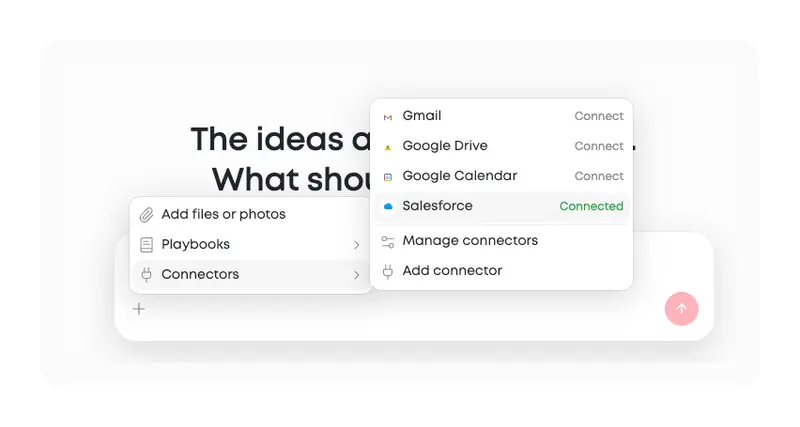
The headline this week is Salesforce. Your CRM data is now something you can ask about directly in chat, with no export step and no second tab.
The rest of the release goes to the parts of chat you touch constantly and probably never think about: answers no longer stop when you move to another conversation, the chat history is sorted the way you actually work, and you can hand a conversation to someone else with a link.
Integrations
Ask about your Salesforce records in chat
You can now connect your Salesforce org to MorningAI and ask about your records the same way you would ask a teammate.
- Which contacts do we have at this account?
- How many open accounts does this rep own?
- What does our pipeline look like in this region?
The answer comes back drawn from your own org's data, inside the chat you were already working in.
Counts are calculated directly from your records rather than estimated, so a number in an answer is a real number you can act on.
The connection is read-only. MorningAI reads your Salesforce data and never writes to it, so nothing in your CRM is created, changed, or deleted. Your credentials are encrypted where they are stored.
Setup involves changes inside your Salesforce org, so plan to have a Salesforce administrator with you when you do it. Your account contact can walk you through exactly what is required and how long it usually takes.
Chat
Share a conversation with a link
You can now share a conversation as a link. The page your recipient opens shows the conversation as you see it, including charts and any generated files, and it does not require a MorningAI account.
When you no longer want it available, revoke it.
Worth knowing before you send one: a shared link is viewable by anyone who has it. There is no sign-in requirement and no expiry date, so it stays live until you revoke it.
Treat a share link like any other public URL, and revoke anything you do not want readable indefinitely.
Like what you're reading?
See these ideas run on your own brand — book a demo and we'll show you MorningAI in action on your products.
A chat history that keeps up with you
The chat history is now sorted by your most recent message rather than by when a conversation was created. A thread you have been working in all week stays at the top instead of sinking below chats you opened once and never returned to.
Search covers every conversation in your account, not just the ones already on screen, and it works while you scroll.
Conversations name themselves right away
A new chat is now readable in the list immediately. The opening words of your first message become the title straight away, and a proper generated title replaces it while the answer is still streaming rather than after the whole reply has finished.
Titles you write yourself are never overwritten. You also have far more room to name things, up to 100 characters, and the field simply stops at the limit instead of rejecting what you typed.
Also in this release
- Fixed bug with multiple agents running concurrently
- Asking about an image now saves properly, so the answer and your question are both still there after a refresh
- Rename and delete now always apply to the row you clicked
- Conversations no longer sit under a placeholder name while an answer is being written
Try the Updates
Log in to your account to test these features. If something breaks or feels off, reach out. We read every message.
The MorningAI Team

Related posts
October 5, 2026 Product Updates: Social Performance Analytics, Klaviyo Connector, and the Agent Sidebar
Channels shows how each post performed, and an Agent turns it into your weekly marketing review. Build Klaviyo campaigns from your brand. Ask the Agent from the sidebar.

September 28, 2026 Product Updates: New Frontier Models in Agents, Agent-Run CMS Publishing, and Tasks Built Into MorningAI
Access the latest models from Anthropic, OpenAI, and xAI, take CMS content end to end with Agents, and manage your team’s work in the new Tasks area.
September 21, 2026 Product Updates: Multi-Model Selection, Smarter Social Post Reviews, and Upgraded Image Creation and Editing in Agents
Agents now let you switch models by task, use recent social performance to improve upcoming posts, and generate a wider variety of images with more control over formats and edits.
