May 1, 2026 Product Updates
BrandDNA visual styles now support text-only custom styles, and Image Studio can use those styles even before previews finish - plus reliability polish.


This week we leaned into how your brand looks in MorningAI: better visual style browsing and text-only custom styles you can define from just a few words. We also smoothed out a few rough edges.
BrandDNA and Image Studio
Visual styles: easier browsing and text-only custom styles
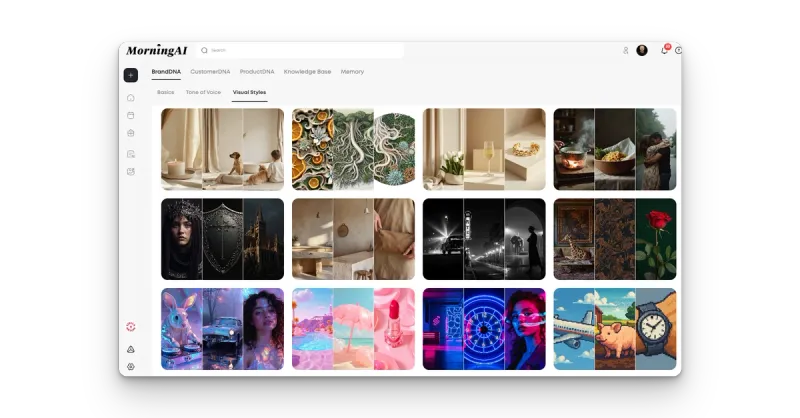
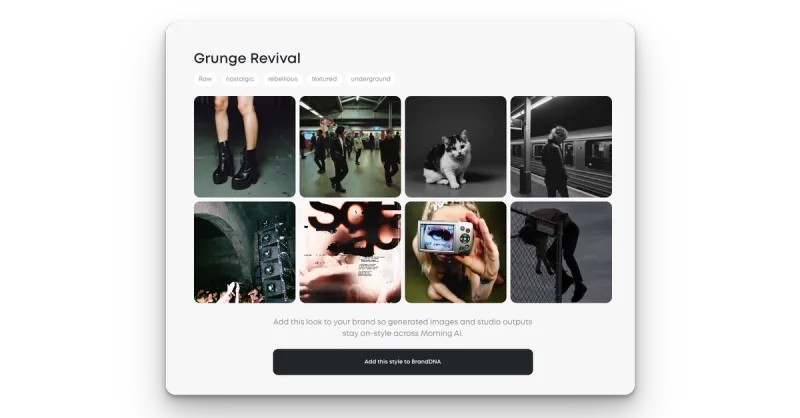
We updated the Visual Styles experience in BrandDNA so it is easier to scan your styles, review a single style in a clearer layout, and see a more helpful empty state when you are starting from zero. You can create custom styles from a description (text-only / description-only), with explicit loading and error states while previews generate—or if a preview cannot complete—so it is obvious what is happening instead of leaving you guessing.
Platform experience
Organization settings layout polish
We refreshed layout and presentation across organization settings screens (including Credits, Members, Billing, organization profile, payment methods, and integration rows) for consistency and readability. Treat this as primarily a visual and layout update unless your team confirms underlying behavior changes.
Like what you're reading?
See these ideas run on your own brand — book a demo and we'll show you MorningAI in action on your products.
Horizon moved under categories
Horizon is no longer a standalone destination on the primary sidebar. Open it from within Studio under “Ads” and the name is “Ad Inspiration”.
Fixes
Deep links to saved creative work
We fixed cases where bookmark or shared URLs to saved output, especially Image Studio where favorites could land on the wrong screen or not show the expected creative. Those links should now resolve to the intended saved item where applicable.
Try the updates
Sign in to MorningAI and open DNA → BrandDNA → Visual Styles, then start a creation flow in Image Studio to try a new style.
– The MorningAI Team

Related posts
September 28, 2026 Product Updates: New Frontier Models in Agents, Agent-Run CMS Publishing, and Tasks Built Into MorningAI
Access the latest models from Anthropic, OpenAI, and xAI, take CMS content end to end with Agents, and manage your team’s work in the new Tasks area.

September 21, 2026 Product Updates: Multi-Model Selection, Smarter Social Post Reviews, and Upgraded Image Creation and Editing in Agents
Agents now let you switch models by task, use recent social performance to improve upcoming posts, and generate a wider variety of images with more control over formats and edits.

September 14, 2026 Product Updates: New Audio in Studio, 20-Image Generation, and Calendar List View
Create audio in Studio, generate up to 20 images in one run, and scan your content more easily with the new Calendar List view.