October 26, 2026 Product Updates: File Knowledge in Agents, Notion Connector, and a New Look for DNA and Calendar Pages
Get answers built on your own documents with Files, bring your Notion workspace into MorningAI with the new Notion connector, and explore the redesigned DNA and Calendar pages.

This week, we connected Files to the Agent, turning your personal and shared documents into one knowledge base. We also launched a Notion connector that brings your entire workspace into the Agent. And we redesigned DNA and Calendar Pages, with a DNA health panel and a Calendar Queue.
Here's what changed.
Files
Use your documents as context for Agent work
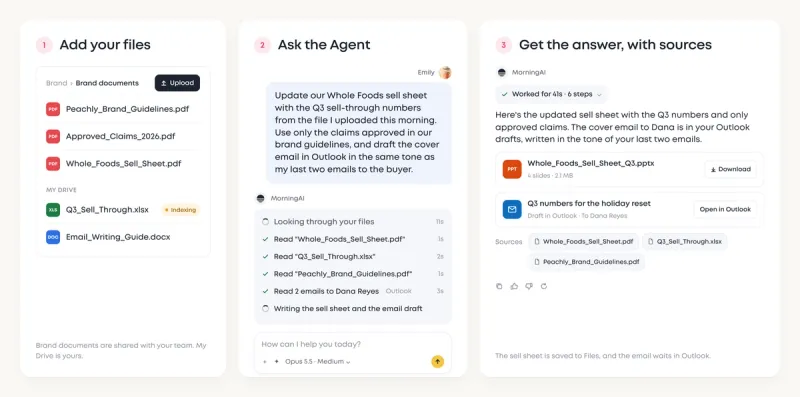
Most AI tools start every chat from zero, so you keep re-uploading the same files just to explain your business. Now in MorningAI, the Agent finds that context directly in Files. It searches and reads the files you can access in the current brand, then cites the documents it used, so you get more accurate, on-brand output you can verify.
Your DNA still holds the information about your brand, products, and customers. Your files add the facts behind your day-to-day work.
For example, you can ask the Agent:
"Update our Whole Foods sell sheet with the Q3 sell-through numbers from the file I uploaded this morning. Use only the claims approved in our brand guidelines, and draft the cover email in Outlook in the same tone as my last two emails to the buyer."
What the Agent does:
- Finds last quarter's Whole Foods sell sheet and the Q3 sell-through report you uploaded to Files.
- Reads your brand guidelines in Files and keeps only the approved claims.
- Reads your last two emails to the buyer in Outlook, through the Microsoft 365 connector, to match their tone.
- Updates the sell sheet and saves the cover email as an Outlook draft, with its sources listed.
Connectors
Manage your Notion workspace and your marketing in one place
The new Notion connector lets the Agent work directly with the pages and databases available to your account.
Connect it under DNA → Connectors → Notion. Once connected, the Agent can help you:
- Turn a launch brief in Notion into a full campaign written in your brand's voice
- See where any project stands and which tasks are slipping, straight from your Notion databases
- Build out a content calendar in Notion with dates and status already set up
- Write new briefs and plans directly into your team's Notion pages
- Send finished images from Studio to the right Notion folder

Like what you're reading?
See these ideas run on your own brand — book a demo and we'll show you MorningAI in action on your products.
DNA and Calendar
Redesigned pages for brand setup and content planning
The DNA redesign makes incomplete brand information easier to identify and product changes easier to review. Calendar adds a dedicated Queue and Day view, so drafts and scheduled posts can be planned together.
1. DNA: identify gaps and maintain your product catalog
BrandDNA, CustomerDNA, and ProductDNA now share a consistent layout, with section cards, a save bar, and DNA health available on every page.
- DNA health: Review setup progress and identify outstanding brand information.
- Product catalog: Switch between Table and Grid views to review products, variants, prices, and completeness.
- Product updates through the Agent: Find products missing key details, create or edit products and variants, and review proposed changes in approval cards before saving.

2. Calendar: organize drafts in Queue and plan with Day view
The Calendar now combines a Queue for ideas and drafts with an hourly Day view, so teams can review content in progress alongside scheduled posts.
- Queue: Manage ideas and channel-specific drafts, with filtering, archive, and restore controls.
- Dated drafts: Place a draft on its planned day while keeping it in Queue. It remains unpublished until scheduled.
- Day view and time zones: Review posts on an hourly grid in your own time zone, or choose a different display time zone.

Also in this release
- Custom video thumbnails: Upload a cover image or select a video frame, with separate thumbnails for Instagram, Facebook, and LinkedIn.
- Live Agent activity: See the Agent's full working process in real time, including each step it takes and the thinking behind it.
Try the Updates
Log in to MorningAI to try this week's updates.
If something feels off or you run into an issue, let us know. We read every message.
– The MorningAI Team

Related posts
October 19, 2026 Product Updates: Microsoft 365 Connector, Gemini 4 Argon & Claude Haiku 5.5 in Agents, and Credit Usage Tracking
Bring Outlook and OneDrive into the Agent with the new Microsoft 365 connector. Try Claude Haiku 5.5 and Gemini 4 Argon in Agents. Track credit usage and set monthly limits on the new Credits page.

October 12, 2026 Product Updates: New Website Agent, All-in-One Social Planning in Agents, and Email & Web Analytics in Channels
Update your website in plain language with the new Website Agent, plan and schedule social posts and campaigns from one chat, and track email and web next to social in Channels.
October 5, 2026 Product Updates: Social Performance Analytics, Klaviyo Connector, and the Agent Sidebar
Channels shows how each post performed, and an Agent turns it into your weekly marketing review. Build Klaviyo campaigns from your brand. Ask the Agent from the sidebar.