September 21, 2026 Product Updates: Multi-Model Selection, Smarter Social Post Reviews, and Upgraded Image Creation and Editing in Agents
Agents now let you switch models by task, use recent social performance to improve upcoming posts, and generate a wider variety of images with more control over formats and edits.

This week, we added multi-model selection in Agents, made it easier to use social performance to review scheduled posts, and upgraded image creation and editing with more variations, platform-ready formats, and edits in chat.
We also shipped a few fixes across Facebook and Instagram analytics and social publishing.
Here’s what changed.
Agents
Choose from multiple AI models
Agents now let you choose which AI model you want to use before you send a request.
The model picker sits directly in the composer, bringing models from Anthropic’s Claude, OpenAI’s GPT, and Google’s Gemini into one place. More models are coming.
MorningAI remembers your selection, so you can keep using the model you prefer or switch when a different task calls for it, whether you’re writing, researching, or creating a document.

Social
Analyze social performance and improve scheduled posts
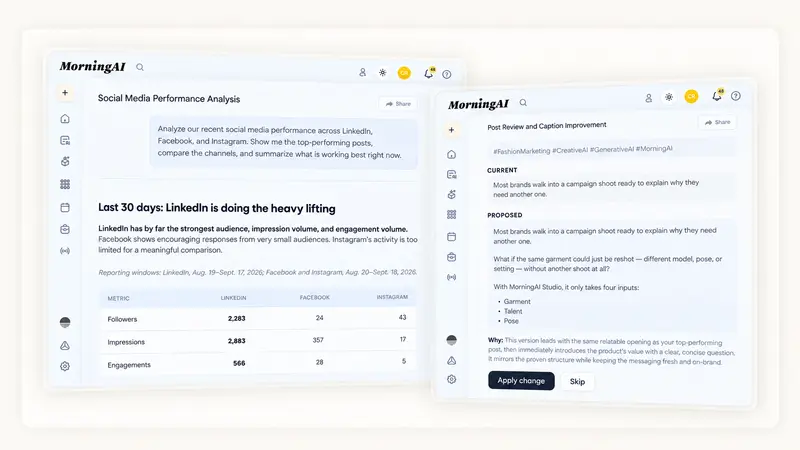
Agents can now work with more of your LinkedIn, Facebook, and Instagram performance data, so you can ask which posts performed best, compare channels, and spot patterns in what is getting the most engagement.
Agents can also work directly with scheduled social content in Calendar. Ask an Agent to review an upcoming post and it can suggest a stronger caption based on recent performance.
For example, you could ask what has been working best on LinkedIn this month, then have the Agent use those patterns to review next week’s scheduled posts.
Images
Like what you're reading?
See these ideas run on your own brand — book a demo and we'll show you MorningAI in action on your products.
Do more with images in Agents
We’ve upgraded image generation and editing in Agents. You can now:
- Generate up to 20 images in one request, with different styles and concepts.
- Get the right aspect ratio by naming a channel or specifying a format.
- Create images that reflect your product and brand, using your product details, colors, and tone.
- Edit a selected image in chat, changing specific details while keeping the rest.
For example, ask: “Create 10 ads for our peach sparkling water, with different looks for different audiences.” Compare the results in a gallery, pick a favorite, then ask your Agent to give it a beach background and make versions for an Instagram Story and an email banner.

Also in this release
We also shipped a few fixes and reliability improvements this week:
- Facebook and Instagram Analytics: Performance data that was previously missing or showing as zero now loads correctly
- Instagram history: Sync now fills the full 90-day reporting window instead of only recent days
- Instagram: Fixed an issue that stopped posting and refreshing for some connected accounts
Try the Updates
Log in to MorningAI to try this week’s updates.
If something feels off or you run into an issue, let us know. We read every message.
– The MorningAI Team

Related posts
November 2, 2026 Product Updates: Upgraded Image Generation in Studio, @Mention Preview in Calendar, and GPT-6.1 Sol & GPT-6.1 Terra in Agents
Studio turns one prompt into several creative concepts at once, Calendar adds a Mentions panel that previews each tag by platform, and Agents adds two new OpenAI models.

October 26, 2026 Product Updates: File Knowledge in Agents, Notion Connector, and a New Look for DNA and Calendar Pages
Get answers built on your own documents with Files, bring your Notion workspace into MorningAI with the new Notion connector, and explore the redesigned DNA and Calendar pages.
October 19, 2026 Product Updates: Microsoft 365 Connector, Gemini 4 Argon & Claude Haiku 5.5 in Agents, and Credit Usage Tracking
Bring Outlook and OneDrive into the Agent with the new Microsoft 365 connector. Try Claude Haiku 5.5 and Gemini 4 Argon in Agents. Track credit usage and set monthly limits on the new Credits page.