September 28, 2026 Product Updates: New Frontier Models in Agents, Agent-Run CMS Publishing, and Tasks Built Into MorningAI
Access the latest models from Anthropic, OpenAI, and xAI, take CMS content end to end with Agents, and manage your team’s work in the new Tasks area.

This week, we brought four new frontier models into MorningAI: Opus 5.5, OpenAI 6 Sol, OpenAI 6 Luna, and Grok 4.7. Agents can now draft, edit, schedule, and publish your Sanity content, with approvals built into the workflow. And the new Tasks area gives your team one place to plan and manage the work, right inside MorningAI.
Agents
Four new frontier models, now in MorningAI
Anthropic, OpenAI and xAI all shipped new flagship models this week, and every one of them is already available in MorningAI. Pick the one that fits the job:
- Opus 5.5 (Anthropic): Anthropic’s latest Opus model for complex reasoning and long-form work.
- GPT-6 Sol (OpenAI): OpenAI’s flagship model for complex, multi-step work.
- GPT-6 Luna (OpenAI): A faster OpenAI model for everyday tasks.
- Grok 4.7 (xAI): xAI’s latest flagship model.
You can switch models directly from the Agent composer. Models that have been replaced are still available under Previous-generation.
Whether you're working through a complex analysis, drafting long-form content, or just want a faster option for everyday work, you can match the model to the task, and MorningAI remembers your choice until you change it.

CMS
Agents can now take Sanity content from draft to publish
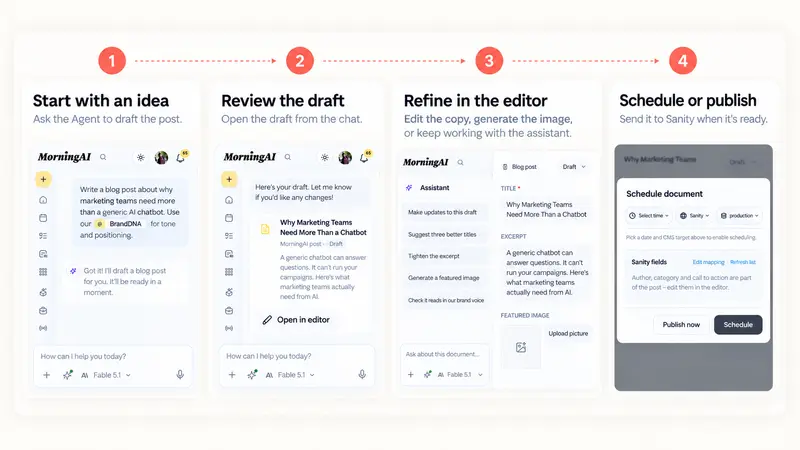
You can now hand more of your existing Sanity workflow to an Agent. Start with an idea and ask for a draft. Stay in the same conversation to refine the copy, generate or swap the images, and schedule or publish the approved version in Sanity.
For example, you could ask: "Draft a post announcing our fall flavors, add a header image, and schedule it for Tuesday at 9am."
It goes beyond blog posts. The Agent can read and edit any document type in your Sanity project, whether that's customer stories, articles, or types you defined yourself, and one editor now opens all of them when you'd rather make a change by hand.
Your Sanity documents also show up on the Calendar next to everything else you have scheduled.
Like what you're reading?
See these ideas run on your own brand — book a demo and we'll show you MorningAI in action on your products.
Tasks
Tasks are now built into MorningAI
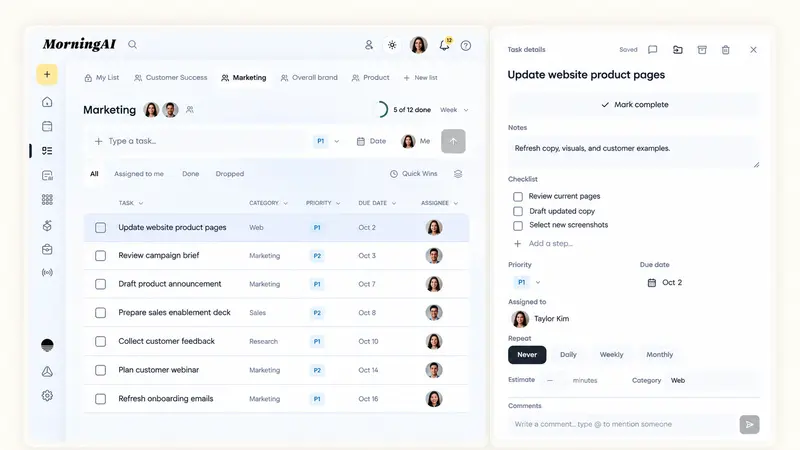
MorningAI now has a dedicated place to manage the work around your campaigns, customers, and team.
Create your own task list or share one with teammates, assign owners, set priorities and due dates, and keep track of what’s moving. Open a task to add checklists, repeating schedules, comments, and @mentions, with updates reflected across the team as work changes.
You can also use bulk actions when you need to move or update several tasks at once, while progress tracking gives you a quick view of how the day, week, or month is going.
Agents can also help manage the same work. For example, you could ask an Agent to set up a launch list, assign the pieces to the right people, or update what’s done, then review the changes before they’re applied.
Also in this release
- Public file links: Share a single uploaded or Agent-generated file with anyone using a public link, without sharing the conversation or folder around it. You can turn the link off at any time, and the new Published view keeps everything you’ve shared in one place.
- Playbooks improvements: Every Playbook page now has a "Use in chat" button that opens the Agent with that Playbook attached, plus a “Try it“ section with example prompts. Click one and the prompt lands in the composer, ready to run. You can also type "/" in the composer to pull up any Playbook by name, and pick a model for each schedule.
Try the Updates
Log in to MorningAI to try this week’s updates.
If something feels off or you run into an issue, let us know. We read every message.
– The MorningAI Team

Related posts
September 21, 2026 Product Updates: Multi-Model Selection, Smarter Social Post Reviews, and Upgraded Image Creation and Editing in Agents
Agents now let you switch models by task, use recent social performance to improve upcoming posts, and generate a wider variety of images with more control over formats and edits.

September 14, 2026 Product Updates: New Audio in Studio, 20-Image Generation, and Calendar List View
Create audio in Studio, generate up to 20 images in one run, and scan your content more easily with the new Calendar List view.
September 8, 2026 Product Updates: A New Apps Hub, Scheduled Playbooks, and Slack in Agents
Navigate MorningAI more easily with the new Apps experience, schedule Playbooks to run automatically, and bring Slack conversations into your Agent workflow.