
Browse Channels
Each social channel in Channels has its own page: LinkedIn, Instagram and Facebook. The page tells you how the channel moved, which posts did the work, and what is coming up next, and the Agent uses the same numbers when it reviews or plans your posts.
Performance
The top of the page is the headline for the period you pick (7, 14, 30 or 90 days):
- A one-line read on what moved, such as engagement up against the period before.
- A short audio briefing of the week, under a minute, with Read the full report for the detail.
- Five metrics, each with a trend line and the change against the previous period: impressions, engagement, followers, new followers and content published. Impressions and engagement are organic only.
Customize picks which metrics appear. Subscribe team sends the report to teammates on a schedule. Sync refreshes the numbers now; the page shows when metrics were last updated.
Posts
Below the headline, Posts lists every post published in the period with the metrics its platform reports: impressions, reactions, comments, shares, clicks and engagement rate. Switch between Table and Gallery, click a post's image to view it full size, and use Export CSV to take the table into a spreadsheet. A post published in the last day shows Analytics coming soon until its platform reports numbers.
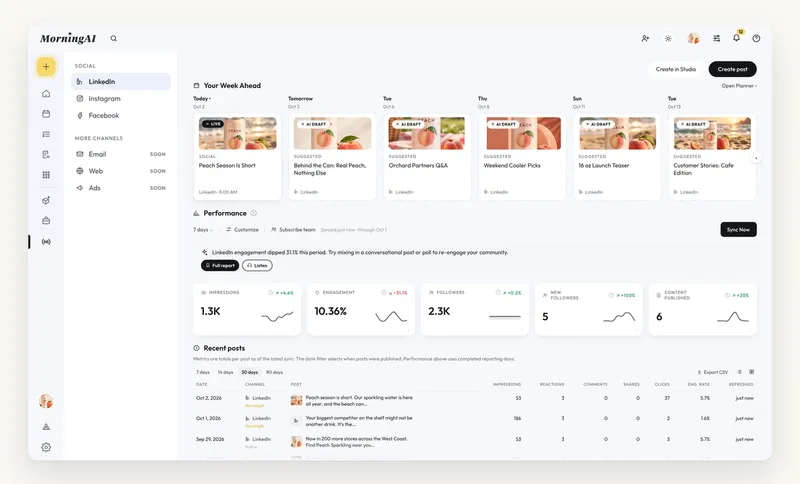
Your Week Ahead
The same page shows what is scheduled for this channel over the coming days, including suggested AI drafts waiting in the Queue, with Open Planner to jump to the Calendar. It keeps the question "what did we publish, and what is next?" on one screen.
Let the Agent do the reading
- "What worked best on LinkedIn this month, and why?" gets you the patterns, not just the numbers.
- "Review next week's scheduled posts against what performed this month" turns the review into edits, each on an approval card.
- The Weekly Marketing Report Playbook pulls LinkedIn, Facebook and Instagram together with Google Analytics, Search Console and Klaviyo into an Excel workbook and a Word write-up. Schedule it for Monday morning. See Playbooks.
Frequently Asked Questions
Why does a post say Analytics coming soon?
It was published within the last day. Platforms report metrics with a delay; check back after the next sync.
Why are impressions marked Organic only?
Channels reports organic performance. Paid results are not included.
How far back does the history go?
Pick 90 days for the longest view. Posts published before you connected the channel may not be included.
Next Steps
If a channel is missing, connect it: Facebook, Instagram or LinkedIn. Then see Email and Web Analytics for the rest of the picture.
