
Browse Agents
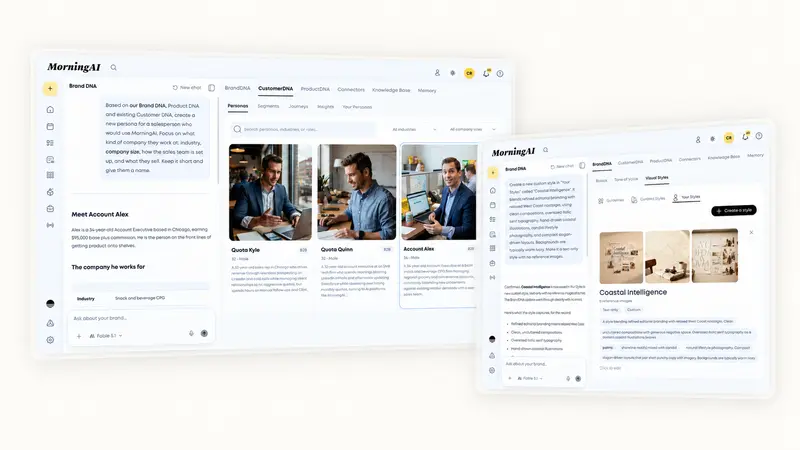
The Agent doesn't only live on the Agents page. On the pages where you do the work, Brand DNA, Customer DNA, Product DNA, Tasks and the Calendar, the Agent sits in a panel on the left. Say what you want changed and keep working; the page updates the moment you approve.
Where the sidebar appears
- DNA pages. Ask for a new persona, a product fix or a tone-of-voice edit while looking at the page.
- Tasks. Plan next week's launch as tasks, ask what is overdue and who owns it, or move everything overdue to Friday.
- Calendar. Write next week's posts, swap a photo, change a time, or put posts under a campaign, with the calendar updating as you approve.
Each page keeps its own conversation, so the context stays with the work. Collapse the panel with the icon at the top left when you want more room, and reopen it from the same place.
An example from Customer DNA
"Create a persona for a salesperson who would use our product. Keep it short and give them a name."
The Agent reads your Brand DNA, Product DNA and current personas, drafts the persona with industry, company size and what they sell, and shows it as an approval card. You approve, and the persona appears in Customer DNA.
Approval cards
Whenever the Agent is about to change something, it shows a card with the exact change before it happens: the persona it will create, the post it will schedule, the product field it will edit. You approve, allow once, or deny. The same cards appear in Chat and in the Website Agent.
If the Agent needs more information, it asks in a question panel. Collapse that panel into a compact bar to see more of the page, and reopen it with your answers still in place.
Which tools ask and which run on their own is set per tool. See Agent Permissions and Approvals.
If your role doesn't cover the change you asked for, the Agent says so and shows an Ask for access card instead. Send the request from the card, and a brand admin approves it under Settings → Users → Requests.
Frequently Asked Questions
Is the sidebar conversation the same as my chat in Agents?
No. Each page keeps its own conversation. Your main conversations stay on the Agents page.
Can I attach files in the sidebar?
Yes. The sidebar composer works like the main one: attach photos, a video to schedule, or a PDF or deck to share as a document post.
Next Steps
Open the Calendar, open the sidebar, and ask for next week's posts. See Plan and Schedule Posts with the Agent for what to expect.

