
Browse Integrations
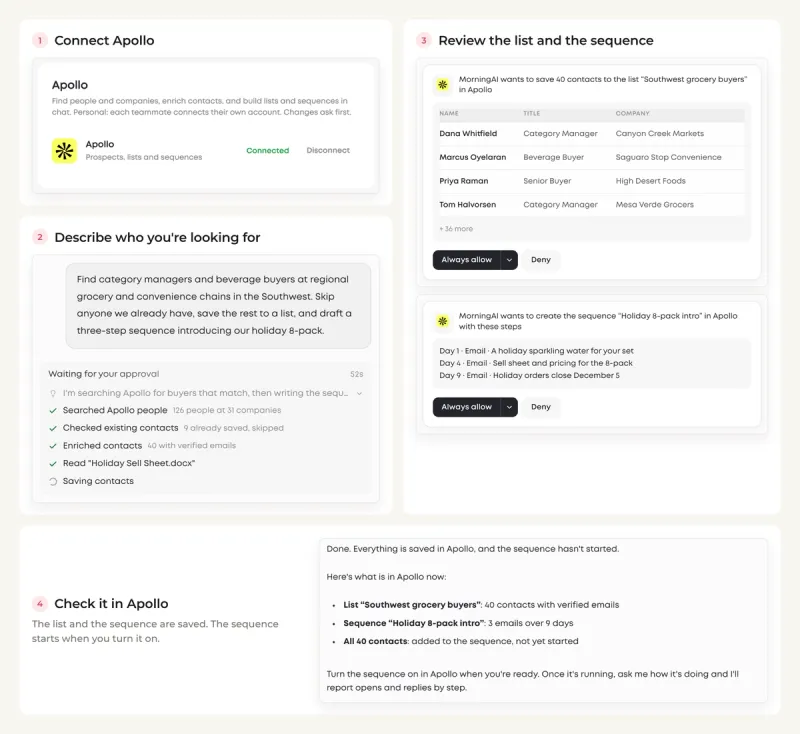
Connecting Apollo to MorningAI takes a minute: go to DNA → Connectors, click Connect on Apollo, and sign in to approve the connection. The Agent can then prospect and start outreach for you. It finds people and companies that match your ideal customer, enriches them with verified emails and job titles, saves them to a list, and writes and loads an email sequence in your brand's voice. Every change asks for your approval first.
Why Connect Apollo to MorningAI
Outbound is two jobs that rarely live in the same place. Building the list means filters, exports and enrichment. Writing the sequence means pulling your positioning, product names and tone from somewhere else, then pasting each step back into Apollo.
With Apollo connected, the Agent does both in one conversation. It searches Apollo with the filters you describe, shows you the matches, saves them, and writes the sequence from your BrandDNA and ProductDNA, so the emails name your real products and sound like your brand. You start the sequence in Apollo when you are happy with it.
This is a personal connector. Each teammate connects their own Apollo account.
How to Connect Apollo (Step by Step)
- Go to DNA → Connectors and click Connect on Apollo.
- Sign in to Apollo and approve the connection.
- Done. The card shows Connected. Ask the Agent to build your first list.
What the Connection Unlocks
Once connected, you can ask the Agent to:
- Search Apollo for people and companies by title, industry, location and company size, and save the matches as contacts or to a new list
- Enrich a list you already have, filling in verified emails and job titles
- Research an account before a call: the company profile, recent job postings and key contacts, plus web research, in a one-page brief
- Write a multi-step email sequence in your brand's voice, create it in Apollo and add the contacts
- Read opens, replies and bounces for each step, point out the weak one and rewrite it
- Summarize this week's replies and create a follow-up task for each contact
Try prompts like these:
- "Find marketing directors at US beverage brands with 50 to 500 employees and save them to a new list."
- "Find category managers and beverage buyers at regional grocery and convenience chains in the Southwest. Skip anyone we already have, save the rest to a list, and draft a three-step sequence introducing our holiday 8-pack."
- "Give me a brief on Whole Foods before my call."
- "Which step in our outbound sequence is underperforming?"
Here is the second request from start to finish. The Agent searches Apollo, skips the people you already have, enriches the rest and reads your sell sheet. It asks before it saves the list and again before it creates the sequence, and the sequence waits in Apollo until you turn it on.
What MorningAI Can and Can't Do
| MorningAI can | MorningAI can't |
|---|---|
| Search people and companies and save them as contacts or to a list | Start a sequence. It loads the sequence and leaves it for you to start in Apollo |
| Enrich people and companies with verified emails and job titles | Save contacts, create a sequence or change a step without showing you an approval card first |
| Create sequences, add contacts to them and rewrite a step | Use a teammate's Apollo account through your connection |
| Read sequence performance, replies and email activity | See your Apollo password |
Your Data, Your Control
The connection is personal: teammates can't use your Apollo account through it, and the Agent can only do what your Apollo account is allowed to do.
Changes ask first. Saving contacts, creating a list or a sequence, adding contacts to a sequence and editing a step each appear as an approval card before they happen. When you disconnect, the stored credentials are deleted.
Enrichment counts against your Apollo plan, the same way it does inside Apollo. For a long list, ask the Agent to show you the matches first and enrich only the ones you keep.
For more on how MorningAI handles data across all connectors, see our security page at /resources/security.
Real-World Use Cases
Outreach before a trade show. Ask the Agent to find buyers in the right region, industry and title. It saves the list and drafts an invitation sequence for your dinner or booth, ready for you to start.
Win back closed-lost deals. With HubSpot connected too, ask for this year's closed-lost deals. The Agent reads the deals and their contacts in HubSpot, writes a win-back sequence and loads it in Apollo.
Reply follow-ups. Ask who replied this week and what to do next. The Agent summarizes each reply and creates a follow-up task for each contact.
Frequently Asked Questions
Does the Agent start sequences for me?
No. It writes the emails, creates the sequence in Apollo and adds the contacts, then leaves it for you to review and start.
Does enrichment use my Apollo plan?
Yes, the same way it does when you enrich inside Apollo. Ask to see the matches before enriching a long list.
Can I send Apollo contacts to HubSpot?
Yes, if both are connected. Ask "Find 50 new prospects in Apollo and add them to HubSpot." The Agent checks HubSpot for existing contacts first, then creates only the new ones, with Apollo as the source.
Does my teammate need to connect too?
Yes. Apollo is a personal connector. Each person connects their own account.
Next Steps
Apollo is connected. Connect HubSpot so new prospects land in your CRM without duplicates, or start with one list: "Find marketing directors at US beverage brands with 50 to 500 employees."
