
Browse Integrations
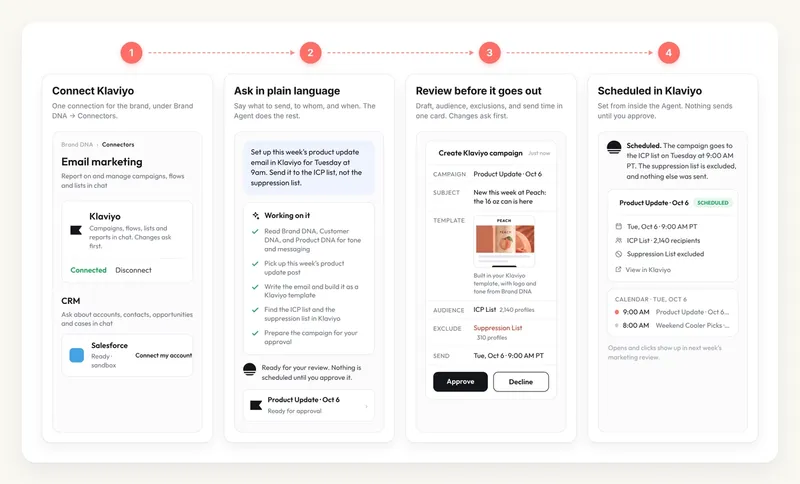
Connecting Klaviyo to MorningAI takes a couple of minutes: go to DNA → Connectors, click Connect on Klaviyo, and approve on Klaviyo's screen. After that, the Agent can plan, build and report on your campaigns, flows and lists, and Channels shows your email performance next to your social channels. Anything that changes your Klaviyo account asks for your approval first.
Why Connect Klaviyo to MorningAI
Writing an email campaign means pulling tone from your brand guidelines, content from this week's announcement, and the right list from Klaviyo, then building the template by hand. Reporting means opening Klaviyo again on Monday to check open and click rates.
With Klaviyo connected, you describe the email and the Agent does the rest: it pulls tone and messaging from your Brand DNA, Customer DNA and Product DNA, writes the email, builds it as a Klaviyo template, finds the right lists, sets the audience and exclusions, and shows you the draft, audience and send time for approval before it schedules. Email performance then appears in Channels alongside LinkedIn, Instagram and Facebook.
Klaviyo is connected per brand, so everyone working in that brand can use it.
How to Connect Klaviyo (Step by Step)
- Go to DNA → Connectors and click Connect on Klaviyo.
- Approve the connection on Klaviyo's screen.
- Done. The card shows Connected. Ask the Agent to set up your first campaign.
What the Connection Unlocks
Build campaigns in your brand's voice. Ask for an email and the Agent writes it from your DNA and recent content, builds it as a Klaviyo template, picks the lists you name, and sets the send time once you approve.
"Set up this week's product update email in Klaviyo for Tuesday at 9am. Send it to the ICP list, not the suppression list."
Report on campaigns, flows and lists. Ask how a campaign performed, which flow drives the most revenue, or how much of your Klaviyo plan you have used this month and what your plan limits are.
Email analytics in Channels. Open Channels → Email to see recipients, click rate, open rate, revenue and unsubscribe rate for the date range you choose, plus your Campaigns and Flows. The Overview page lines these up with your social and web numbers.
The weekly marketing report. The Weekly Marketing Report Playbook pulls Klaviyo into the same review as your social channels, Google Analytics and Search Console.
What MorningAI Can and Can't Do
| MorningAI can | MorningAI can't |
|---|---|
| Write and build campaigns as Klaviyo templates | Send a campaign without your approval |
| Find lists and segments and set audience and exclusions | Edit your lists or profiles without asking first |
| Report on campaigns, flows, lists and plan usage | Replace Klaviyo's own deliverability or compliance tools |
| Show email performance in Channels | Show data for a brand where Klaviyo isn't connected |
Your Data, Your Control
You approve the connection on Klaviyo's screen, and MorningAI never sees your Klaviyo password. Changes ask first: creating a template, setting an audience or scheduling a send each appears as an approval card before it happens.
When you disconnect, the stored credentials are deleted. You can also remove MorningAI's access from your Klaviyo account settings at any time.
For more on how MorningAI handles data across all connectors, see our security page at /resources/security.
Frequently Asked Questions
Will the Agent send an email on its own?
No. It shows you the draft, the audience and the send time, and schedules only after you approve.
Why is Channels → Email empty?
Email reads from the Klaviyo connection for the current brand. Connect Klaviyo under that brand's DNA → Connectors, then give it a few minutes to sync.
Can I ask about my Klaviyo plan usage?
Yes. Ask the Agent how much of your plan you have used and what the limits are.
Next Steps
Klaviyo is connected. Open Channels to see email next to your social performance, or run the Weekly Marketing Report to put all of it in one review.

